For small law firms · every practice area

Never miss a date.

A second set of eyes on every deadline.

DocketBridge works alongside Clio, your calendar and your other tools. It finds deadlines that are missing, stale or unacknowledged, and reads court and agency notices so nothing slips through.

Get a free Deadline Audit   See how it works

Free Deadline Audit + free 30-day pilot. Hosted or self-hosted.

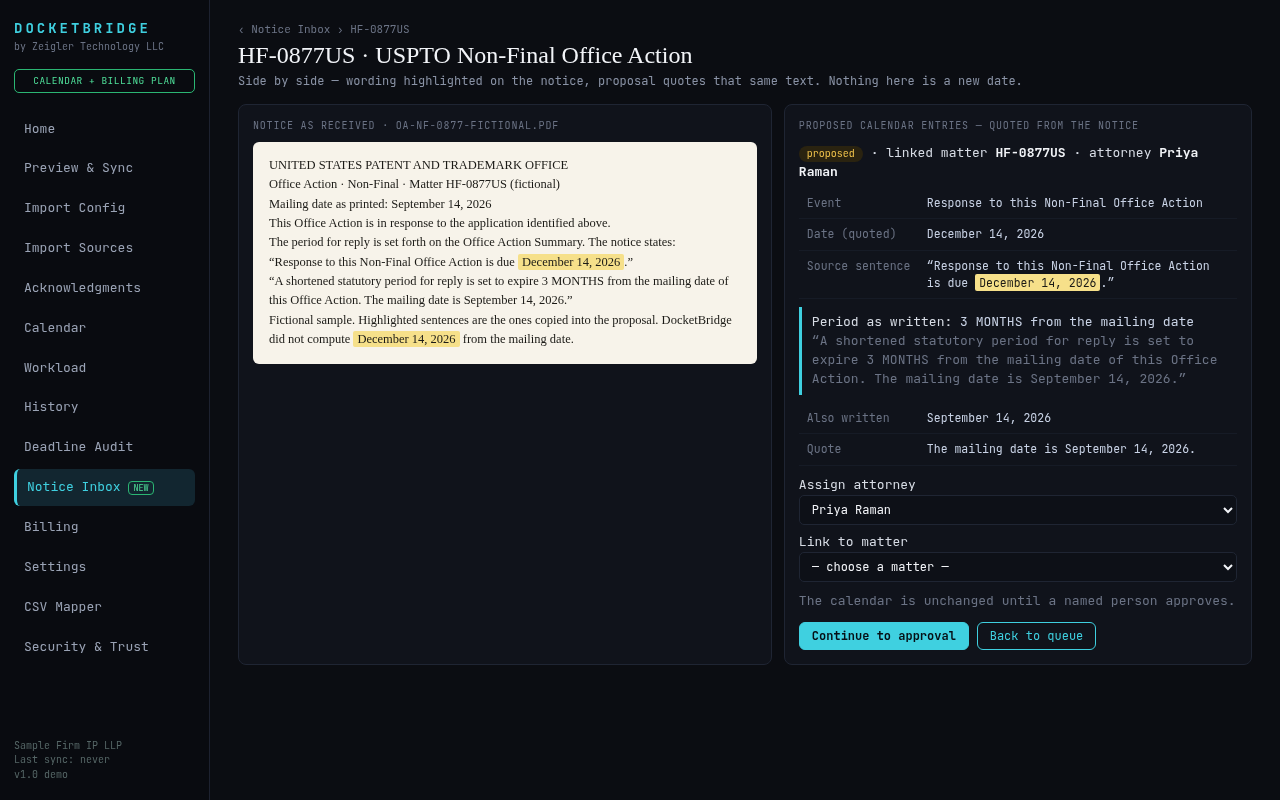
Notice Inbox: a notice shown side by side with the proposed calendar entry, quoting the exact date

Keep your system. Add a safety net.

DocketBridge never calculates a deadline, and AI never sets one. Every date is copied exactly as written in the source — your practice-management system, calendar export or the notice itself — shown next to where it came from, and nothing reaches a calendar until a named person approves it.
Deadline Audit Report

Find the gaps

Compares your docket or calendar against your sources and lists deadlines that are missing, show a different date, have no attorney, or were never acknowledged.

Notice Inbox

Read every notice

Drop in court or agency notice PDFs. DocketBridge proposes each date exactly as written, with the source sentence highlighted. A person approves each one.

Calendar sync

Right calendar, right attorney

Approved deadlines sync to Clio, Google or Outlook calendars. A sync never deletes an event on its own.

Acknowledgment

Someone owns it

When a deadline is added or changed, the responsible attorney confirms they've seen it. Unconfirmed items escalate.

Morning briefing In testing

Start the day informed

Overdue, due today and due this week, plus notices to review and dates that need a look.

Client update drafts In testing

Drafts, not sends

Editable client letters built from approved docket entries. An attorney approves each draft. Nothing is sent automatically.
Who it's for

Small firms in any practice area where a missed date means a missed hearing, a lost claim or a malpractice claim.

Litigation

Court orders, hearing notices and scheduling orders read into proposed dates, quoted word for word.

Family law

Hearings, mediation and filing dates from court notices, checked against your calendar.

Personal injury

Find calendar gaps across a large caseload before they become a problem.

Estate & probate

Court and filing dates tracked with an attorney who owns each one.

Immigration

Hearing and filing dates from notices, approved by a person before they sync.

Intellectual property

USPTO notices and AppColl dockets, plus the optional Patent Pack.

Works with what you already use

Keep your practice-management system. DocketBridge reads from it and checks it.

Available now

Read deadlines from

  • Clio (sign-in, read-only)
  • AppColl export
  • Calendar files (.ics) from Outlook, Google or any docketing system
  • Any CSV export, mapped to your columns
Available now

Sync approved dates to

  • Clio calendar
  • Google Calendar
  • Outlook / Microsoft 365 calendar
By request

Direct connections

MyCase, PracticePanther, Smokeball and Actionstep need API access from each vendor. Until then, use their calendar or CSV export. Ask us and we'll set it up with you.

How the free Deadline Audit works

Send an export

Connect Clio, or send a calendar file or CSV export from any system.

We run the audit

DocketBridge lists deadlines that are missing, stale, unassigned or unacknowledged — each with the source it came from.

Review together

We walk through the findings with you. If it helps, start a free 30-day pilot.

See what your docket might be missing.

Send us a docketing export. We'll run a Deadline Audit and walk you through the findings — free.

Get a free Deadline Audit